Announcing Supervertaler MCP Server: let Claude for Desktop work directly with your Trados project! Thread poster: Michael Beijer
|
|---|
Michael Beijer 
Ujedinjeno Kraljevstvo
Local time: 23:34
Member
Dutch to English
+ ...
Hi guys, I just wanted to mention that I have released an MCP server that lets you connect Claude for Desktop to Trados Studio, using Supervertaler for Trados as a bridge.
Once you install the MCP server, here's an example of the kind of thing you can do in Claude for Desktop:
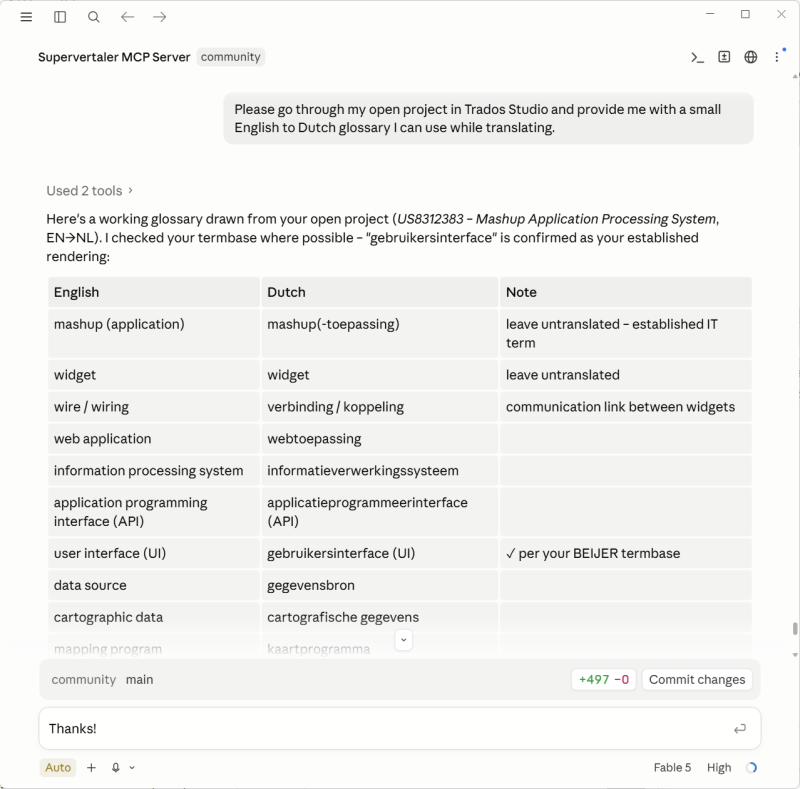
In the chat, you can basically ask Claude anything, and Claude has direct access to your actual Trados Studio project. That is, it can navigate to actual segments, edit text in segments, run all kinds of QA and other tools on your project, consult term bases and translation memories, add or remove or edit comments, etc. Playing around with this today has been absolutely insane. And the craziest thing is that I built the whole MCP server in a single day! That is, Claude Code (using Fable 5) built it, with my dictated commands via Wispr Flow.
Info here: https://docs.supervertaler.com/trados/mcp-server/
I am adding more functionality to it daily, but it is already extremely powerful. I did some proofreading of a gigantic project in Trados Studio 2026 today, and combining my new Supervertaler MCP Server with Wispr Flow for dictation has taken things to a whole new level of fun. You can simply open your CAT tool and chat with Claude on desktop.
Feel free to try it out in the latest version, which is available on the RWS AppStore and supports both Trados Studio 2024 and the new (64-bit!) Trados Studio 2026:
https://appstore.rws.com/plugin/432
Michael
| | | | Michael Beijer
Ujedinjeno Kraljevstvo
Local time: 23:34
Member
Dutch to English
+ ...
TOPIC STARTER | a quick update on using the new Supervertaler MCP Server together with Trados Studio 2026! | Jul 22 |
Hi guys,
Just a quick update on this. After implementing the Supervertaler MCP Server, I started using it on real translation jobs, as follows:
• I open a project in Trados Studio 2026.
• I open a fresh chat in Claude for Desktop and give it a prompt along these lines:
------------ ---------------- --------------- ---------------- ---------------
I'm translating a project from English into Dutch, and I have it open in Trados Studio 2026. Ple... See more Hi guys,
Just a quick update on this. After implementing the Supervertaler MCP Server, I started using it on real translation jobs, as follows:
• I open a project in Trados Studio 2026.
• I open a fresh chat in Claude for Desktop and give it a prompt along these lines:
------------ ---------------- --------------- ---------------- ---------------
I'm translating a project from English into Dutch, and I have it open in Trados Studio 2026. Please analyze the project.
As you'll see, a large portion of it is already 100% and CM (context) matches – i.e. confirmed. As a rule, we can ignore any confirmed segment. Your job is to translate the rest and make sure it's consistent with the whole document.
It's also your job to make sure the whole document is consistent and correct. If you find things in already-confirmed segments that aren't correct, you can fix them.
If you find a segment that isn't confirmed, isn't set to translated, and has a high fuzzy match (say 93–95%), you can use it as a reference – but make sure to insert a 100% correct translation. Don't just copy high matches or use them without thinking.
Please also consult all the client's notes and references in this folder: D:\Example\refs
You can also look at the source document as a PDF for reference if you need it: D:\Example\Example source document.pdf
------------ ---------------- --------------- ---------------- ---------------
I then translate the project interactively in Studio, just by chatting with Claude.
I don't even touch my keyboard – I use Wispr Flow for all the communication. I keep the Claude chat window open on one monitor, with Trados Studio on my main monitor. As I talk to Claude, I can watch things update in real time in my Trados project.
If Claude is unable to do something, I simply switch to the Claude Code tab in the Claude for Desktop app and tell Claude Code to implement it. It gets to work, and I switch back to the translation chat tab to carry on. This lets me improve the system iteratively while using it to translate a real project at the same time!
If anyone would like to try this themselves, feel free to grab the trial version of Supervertaler for Trados (https://appstore.rws.com/plugin/432). If you have any questions at all, just ask me here or at [email protected]. Incidentally, the trial period is 14 days, but I would be more than happy to extend it as long as you need.
Michael
info:
https://appstore.rws.com/plugin/432 (RWS AppStore)
https://docs.supervertaler.com/trados/mcp-server/ (Docs)
https://supervertaler.com/trados/ (website)
https://github.com/Supervertaler/Supervertaler-for-Trados (GitHub repo)
[Edited at 2026-07-22 20:20 GMT] ▲ Collapse
| | | | To report site rules violations or get help, contact a site moderator: You can also contact site staff by submitting a support request » Announcing Supervertaler MCP Server: let Claude for Desktop work directly with your Trados project! | PerfectIt | Check translations faster for consistency, quality and style guide compliance
PerfectIt helps professional translators deliver error-free documents in Microsoft Word and PowerPoint. It helps improve consistency, ensure quality, and enforce style guides. ProZ members receive a 30% discount off individual purchases of PerfectIt.
More info » |
| | Pastey | Your smart companion app
Pastey is an innovative desktop application that bridges the gap between human expertise and artificial intelligence. With intuitive keyboard shortcuts, Pastey transforms your source text into AI-powered draft translations.
Find out more » |
|
| | | | X Sign in to your ProZ.com account... | | | | | |



 Login to reply/comment